
In enterprise networks, a substantial portion of DNS issues actually stems not from name resolution failure, but from the wrong forwarder choice and uncontrolled cache behavior. When the user network, application segment, and management corridor all bind to the same resolver, after a certain point it becomes hard to read which query is going where. Unbound is a powerful tool to solve this without adding complexity: you can define separate policies, separate forward zones, and controlled cache behavior for different access networks.
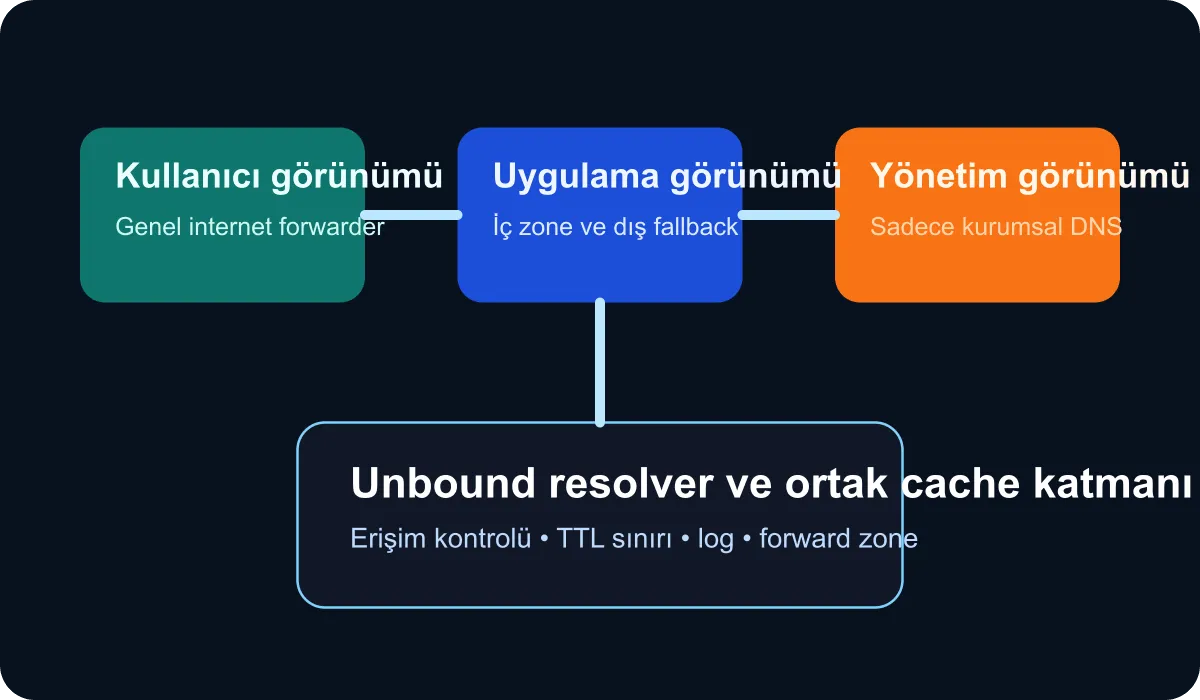
Setup goal
In this guide we set up the following example scenario:
- The
10.10.0.0/16user network will use a public forwarder for internet resolution. - The
10.20.0.0/16application network will go to corporate DNS for internal zones, and to a controlled external forwarder for other records. - The
10.30.0.0/16management network will be allowed to resolve only internal zones.
This setup is simple enough to start with a single Unbound instance, yet realistic enough to show segment-based behavior.
Sample configuration
A minimal unbound.conf example might look like this:
server:
  interface: 0.0.0.0
  port: 53
  do-ip4: yes
  do-ip6: no
  access-control: 10.10.0.0/16 allow
  access-control: 10.20.0.0/16 allow
  access-control: 10.30.0.0/16 allow
  access-control: 0.0.0.0/0 refuse
  prefetch: yes
  cache-min-ttl: 60
  cache-max-ttl: 900
  logfile: "/var/log/unbound.log"
  verbosity: 1

view:
  name: "users"
  view-first: yes
  access-control-view: 10.10.0.0/16 users
  forward-zone:
    name: "."
    forward-addr: 1.1.1.1
    forward-addr: 1.0.0.1

view:
  name: "apps"
  view-first: yes
  access-control-view: 10.20.0.0/16 apps
  forward-zone:
    name: "corp.internal."
    forward-addr: 10.50.0.10
  forward-zone:
    name: "."
    forward-addr: 9.9.9.9

view:
  name: "admin"
  view-first: yes
  access-control-view: 10.30.0.0/16 admin
  local-zone: "." refuse
  forward-zone:
    name: "corp.internal."
    forward-addr: 10.50.0.10
The key thing to note here is the view-first behavior. Clients are processed by their matching view first; this way, different forwarder policies can be applied based on context on the same resolver.
Why are we keeping TTL values tight?
In enterprise environments, very long TTLs initially look like a performance gain; but they amplify the cache effect during change and incident windows. Especially for integration endpoints, failover records, or service names that change during maintenance, short but meaningful TTLs are safer. In the example above, with cache-max-ttl: 900, we don’t leave the cache to live forever; we still reduce unnecessary load at the resolver level.
Tests for daily operations
After installation, run these tests from separate client networks:
dig @resolver-ip example.com
dig @resolver-ip app01.corp.internal
dig @resolver-ip txt suspicious-domain.test
The expected behavior should be:
- The user network shouldn’t resolve the internal zone.
- The application network should resolve both the internal zone and controlled external records.
- The management network shouldn’t resolve external internet names.
Evaluate these tests not only by successful answers but also by the correct refusal behavior.
Logging and observability suggestions
Unbound on its own doesn’t offer broad observability; but when wired to the right places, it gives sufficient signal. I recommend feeding the following fields to the central log pipeline:
- Client IP or segment label
- Query name and type
- Response code
- Latency and upstream target
That way you can see DNS cache hit ratio and policy violation behavior on the same dashboard. Especially in the management segment, external name resolution attempts produce a valuable signal.
Common mistake: Spinning up a new resolver per segment
In large organizations this is sometimes necessary; but most teams fragment too early. It’s healthier to first set up policy separation on the same tool and make the behavior visible. If scale or regulation demands it, you can move to physical separation afterward.
Conclusion
Regional DNS cache and forwarder separation with Unbound turns the resolution layer into a readable network control. By setting up segment-based access, different forwarder paths, and controlled cache behavior on a single resolver software, you can boost both security and diagnostic capability. Especially in enterprise application and management networks, this approach delivers a quiet but effective infrastructure win.