
In enterprise cloud architecture, capacity planning often gets squeezed between two bad extremes: either you over-reserve and inflate costs, or you trust average utilization numbers too much and run into a performance squeeze at the critical moment. Yet the question that meaningfully governs capacity is not the CPU average; it is which load behavior the service objective must guarantee. SLO-based capacity reservation makes exactly this distinction visible.
Why is average utilization misleading?
Because in enterprise systems, load does not distribute evenly. ERP integrations may pile up at end of day, a self-service platform may experience an evening pipeline burst, security scans may produce sudden waves within specific windows. While the average utilization chart looks calm, queue latency or error rate can quietly cross critical thresholds.
For this reason, deciding capacity solely on percent utilization may look like cost optimization, but in reality it is shifting risk in an invisible way.
How does an SLO connect to capacity reservation?
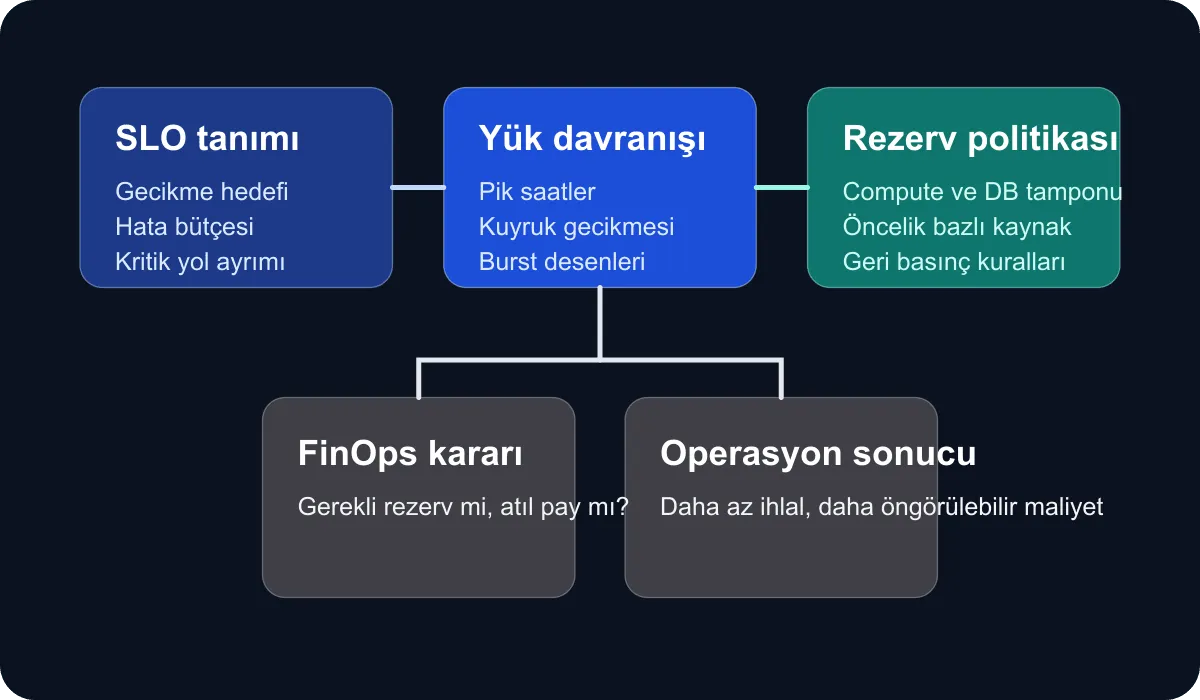
The SLO tells you how fast and reliably the system must behave. Capacity reservation, on the other hand, sets the safety margin needed to carry that target. When you think about the two together, the following framework emerges:
- The acceptable latency and error budget is defined.
- Load patterns that violate these targets are derived.
- A reserved capacity class is set aside for high-impact peaks.
- Lower-priority workloads are managed via backpressure or queueing.
In other words, reserved capacity stops being an “expensive resource sitting idle”; it turns into an operational buffer that protects the service promise.
At which architectural layers is it applied?
In enterprise cloud, SLO-based reservation is not a single service setting. It is typically built across three layers:
- Compute layer: node pool, autoscaling limit, reserved instance or committed use plan
- Data layer: connection pool, IOPS ceiling, replica strategy
- Network and edge layer: egress capacity, load balancer thresholds, rate-limit policy
When one of these layers is neglected, the capacity issue resurfaces on another surface. For example, if autoscaling works at the application layer while the database connection ceiling stays fixed, capacity appears to grow but user experience degrades.
How do FinOps and operations meet at the same table?
The critical point here is to take cost optimization out of the “consume fewer resources” narrative. A more accurate approach is this:
- Which capacity reserve protects the SLO?
- Which reserve only provides assumption-based comfort?
- Which workload can be deferred or shifted to a different time window?
Through these questions, the FinOps team reduces cost without creating blind outage risk, and the platform team is no longer forced to defend every additional safety margin. The shared language emerges.
A decision model that works in practice
In similar setups, the following decision matrix works effectively:
- Critical customer flow: high reserve, aggressive observation, low tolerance
- Internal operations service: medium reserve, controlled queueing
- Batch or reporting: low reserve, scheduled backpressure
- Temporary experimentation environment: minimum reserve, hard quotas
This classification aligns capacity with business impact. That way, you do not have to restart the same debate from scratch for every system.
How is success measured?
Cost reduction alone should not count as success. In my view, these three signals should be tracked together:
- Frequency of SLO violations during peak traffic moments
- Forecast accuracy of capacity-increase requests
- The ratio between idle reserve and outage-prevention impact
If the capacity plan improves these signals together, the architecture is doing its job.
Conclusion
In enterprise cloud, SLO-based capacity reservation makes classical capacity planning service-centric. It becomes visible not only how much of the resource is consumed, but also what is being guaranteed. The result is not a more expensive but a more deliberate capacity model; this in turn makes both cloud cost and enterprise trust more manageable.