
As management access grows across distributed data centers, cloud, and remote office environments, the classic VPN model starts to struggle. Thick tunnels that funnel everyone into the same network blur the access boundary instead of clarifying it. A Headscale-based enterprise management network overlay design offers a more controlled path right here: a centralized coordination plane, a short list of clients, and only the necessary nodes seeing each other.
What problem does this approach solve?
In many organizations, management access grows in layers over time:
- A second bastion is added on top of the first
- Separate VPN profiles are opened for remote offices
- Server teams and platform teams share the same network corridor
- Temporary exceptions for emergency access become permanent
The result is that network access exists, but the access model is unreadable. A Headscale-based overlay reduces this disorder by tying access to identity and device membership rather than physical location.
How should the core architecture be built?
In practice, three layers are sufficient:
- The Headscale control plane
- Managed clients and servers
- Visibility boundaries defined through a policy file
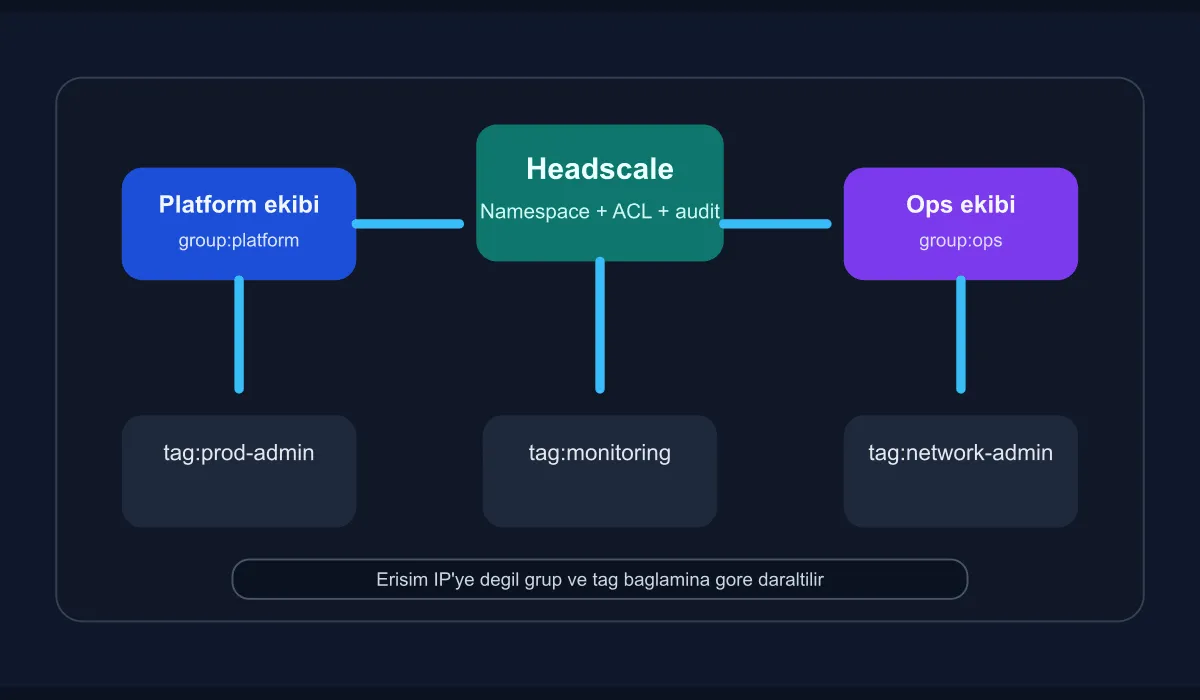
The critical decision here is to avoid building the overlay network with an “everyone reaches everywhere” mindset. The goal is not L3 convenience but narrowing management traffic with explicit ownership. That is why the namespace, group, and ACL model must be considered from day one.
Initial components
For a small but production-near setup, the following components are sufficient:
- A Headscale service on a Linux server
- A Tailscale-compatible agent for clients
- A registration flow integrated with the corporate identity system
- A separate DNS resolution or MagicDNS decision
- Log and audit monitoring
Headscale lets you keep the control plane in your own hands; but in return, you must establish lifecycle and policy discipline yourself. So in the early stages, focus more on the ownership model than on user count.
Sample configuration skeleton
A simple starting example for config.yaml:
server_url: https://headscale.example.internal
listen_addr: 0.0.0.0:8080
metrics_listen_addr: 127.0.0.1:9090
ip_prefixes:
  - 100.64.0.0/10
dns_config:
  override_local_dns: true
  nameservers:
    global:
      - 10.20.0.53
derp:
  server:
    enabled: false
This structure alone is not sufficient; but it clarifies which responsibility lies with you. Writing DNS, metrics, and address range decisions explicitly from the start reduces overlay complexity later.
Build the ACL model narrowly from the start
The most common mistake in enterprise use is opening the initial setup with a wide ACL. Then teams get used to that broad access, and tightening becomes politically difficult. Instead, defining narrow visibility from the very beginning is healthier.
A sample ACL approach:
{
  "groups": {
    "group:platform": ["[email protected]", "[email protected]"],
    "group:ops": ["[email protected]"]
  },
  "tagOwners": {
    "tag:prod-admin": ["group:platform"],
    "tag:network-admin": ["group:ops"]
  },
  "acls": [
    {
      "action": "accept",
      "src": ["group:platform"],
      "dst": ["tag:prod-admin:22,443"]
    },
    {
      "action": "accept",
      "src": ["group:ops"],
      "dst": ["tag:network-admin:22,179"]
    }
  ]
}
The point to note in this example is that access is bound to roles and tags rather than IPs. Even if a server is moved, the management rule keeps working with the same logic.
How should operational verification be done?
After installation, be sure to apply the following checks:
- Does a new client appear only with the expected tags?
- Do DNS queries flow through the corporate resolver?
- Do devices registered with the wrong group gain access?
- Are production services unaffected even if the overlay goes down?
- Do audit logs carry information about who connected, when, and with which device?
Without these checks, the overlay network appears to work but the management plane silently expands too far.
When is Headscale not the right choice?
If the organization’s real need is not full mesh but stable site-to-site transport, an overlay control plane may be more abstraction than necessary. Similarly, without operational discipline to manage device lifecycle and identity integration, Headscale quickly turns into a “yet another tool” problem.
For this reason, the following questions should be asked first:
- Can we tag management access from user all the way down to device?
- Are we tying overlay membership to the offboarding process?
- Do we have a relay or DERP strategy for areas with weak internet egress?
- Will we actually read the audit log of this network?
If there are no clear answers to these questions, the operating model needs to be cleaned up first.
Conclusion
Designing an enterprise management network overlay with Headscale can turn the classic VPN tangle into a more readable, identity- and device-based access model. Its value lies not only in offering a self-hosted control plane, but in being able to build the management network with explicit policy and a narrow visibility principle. To get a good outcome, the following discipline must be preserved from day one: setting up the overlay is easy, but keeping it alive within enterprise boundaries is the real work.