
Vulnerability management on enterprise internal networks usually swings to one of two extremes. Either comprehensive scans run rarely and the results sit unprocessed for weeks, or scans run so frequently that the noise level erodes team confidence. Nuclei is a good tool for striking this balance, because its verifiable template approach produces narrowly scoped, low-cost, automation-friendly checks.
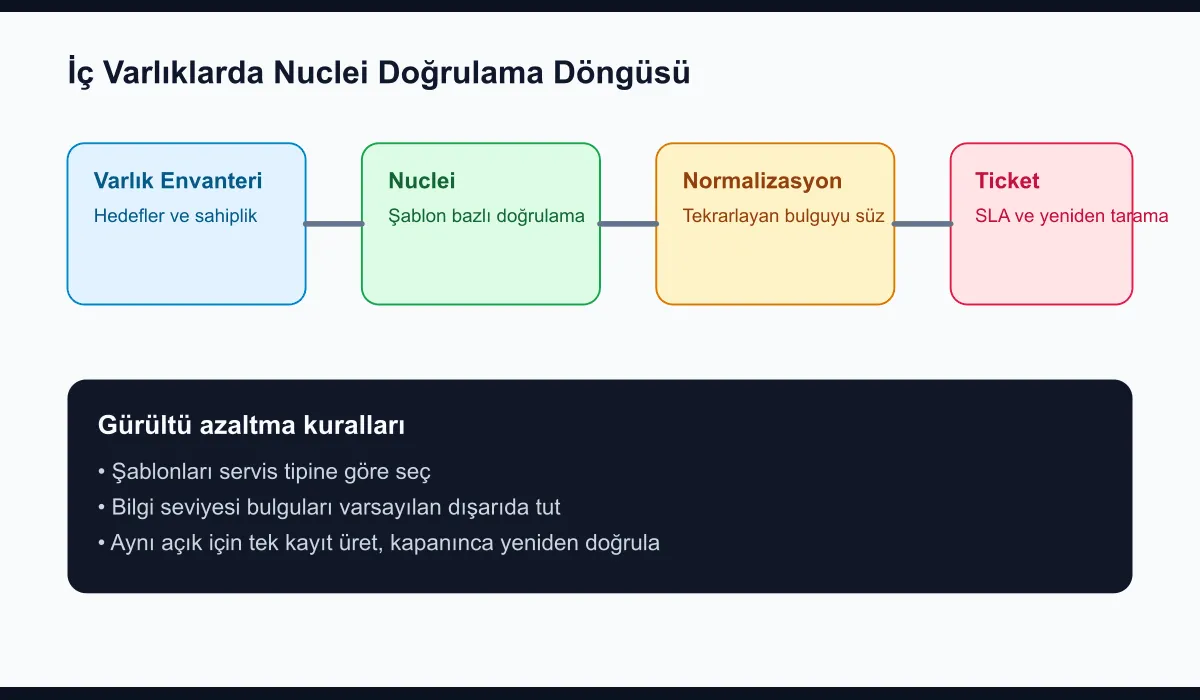
Why consider Nuclei for internal networks?
Nuclei is usually mentioned in the context of internet-facing scans, but it is equally strong for internal assets. It produces particular value in scenarios such as:
- Forgotten default paths in management panels
- Vulnerabilities verifiable from exposed version information
- Missing headers or configuration items outside the corporate standard
- Known middleware and agent surfaces
The main idea here is not to blindly try every port; it is to validate inventory using meaningful template sets aligned with known service classes.
How should the target list be prepared?
The healthiest model is to feed targets from CMDB or service inventory. At a minimum, the following fields should exist:
- Asset name
- IP or FQDN
- Service type
- Environment class
- Owner team
With this data, you can apply Nuclei templates not uniformly across the entire network, but according to the service profile.
Sample target file:
https://grafana.internal.example.com
https://vault.internal.example.com
https://jenkins.internal.example.com
Basic scan command:
nuclei -l targets.txt -tags exposures,misconfig,default-login -severity medium,high,critical -jsonl -o findings.jsonlHow do you reduce noise?
This is where you make the real difference. The following filters matter when setting up continuous validation on the internal network:
- Splitting templates by service class
- Excluding low-value information findings by default
- Disabling aggressive checks outside maintenance windows
- Avoiding turning the same finding into a ticket again and again
In practice, a daily light scan produces more sustainable results for most teams than a weekly deep scan.
How does it tie into the operations workflow?
The worst kind of usage is producing JSON output and dropping it into a folder no one looks at. The flow I recommend is this:
- Produce Nuclei output in
jsonl - Do not reopen the same finding if an open record exists
- Map the owner team from the asset inventory
- Turn only validated medium-and-above findings into tickets
- Run a short SLA and re-validation for critical findings
This model takes vulnerability management out of report generation and turns it into closable operational work.
Sample scheduling
A simple cron approach can be sufficient:
15 2 * * * nuclei -l /srv/nuclei/targets.txt \
  -tags exposures,misconfig,default-login \
  -severity medium,high,critical \
  -jsonl -o /srv/nuclei/out/findings-$(date +\%F).jsonl
After this command, you can normalize the findings with a small parser and match them against your existing ticketing system.
The most common mistake
Running the entire template repository against the internal network without any filter is a frequent mistake. When done that way, unnecessary noise builds up and some teams perceive the scan as an attack. A better starting point is to choose a narrower but reliable template set, then expand the scope once trust in the system is built.
Conclusion
Continuous vulnerability validation on internal assets with Nuclei lifts internal network security out of periodic scan reports and turns it into a living control layer. When target inventory, classified template sets, and a ticket flow that reduces duplicates are built together, noise drops and the share of findings that actually get closed rises. Solid vulnerability management is not the system that produces the most findings; it is the one that runs the most consistent validation loop.