
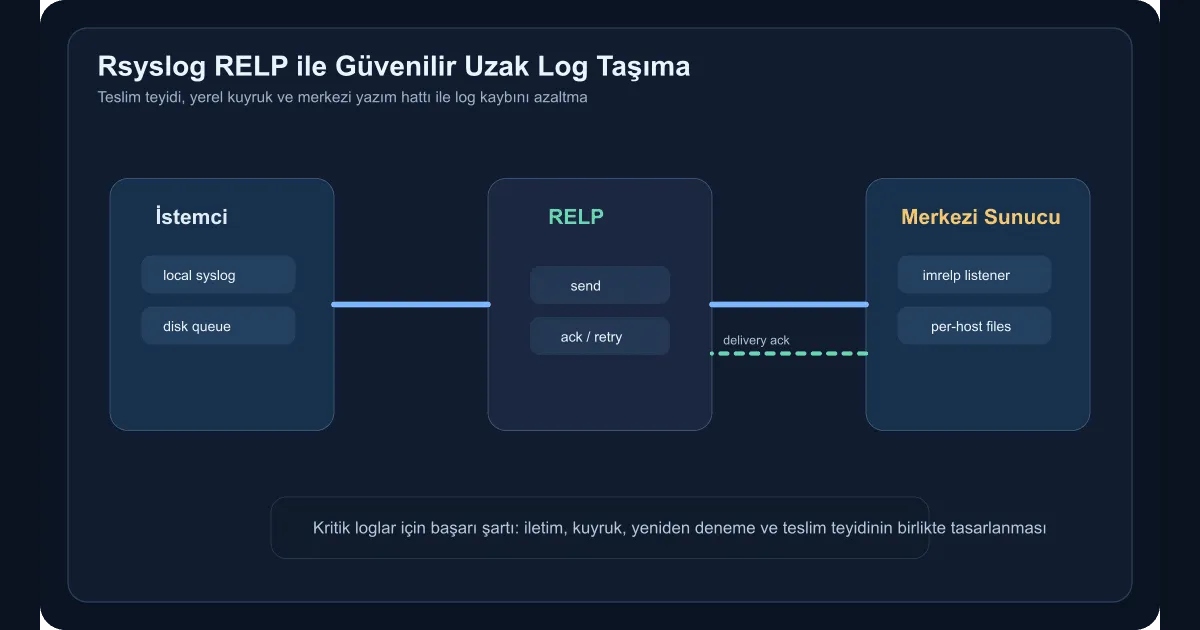
The weakest moment for an enterprise log pipeline is when the network briefly misbehaves. Apps and servers keep producing logs, but the layer that ships them to the central system can drop lines while that’s happening. For security, audit, and operational records, that loss is unacceptable. Pairing rsyslog with RELP is exactly where the value shows up. The transport doesn’t just say “I sent it” — it relies on the receiver confirming the delivery.
Why is RELP different from classic syslog over TCP?
For most teams, plain TCP feels like enough of a guarantee. But when the connection drops, during reconnect, or when the receiver slows down, knowing exactly which messages actually got processed is hard. RELP closes that gap:
- Each message carries a transaction ID
- The receiver acknowledges acceptance
- Delivery resumes more reliably after an interruption
These properties matter especially for security events, sudo records, system logs, and critical application journals.
Server-side setup
First, enable the modules you need on the central log server. A Debian-based example:
sudo apt update
sudo apt install rsyslog rsyslog-relp -y
Then drop the basic listener configuration into /etc/rsyslog.d/10-relp-server.conf:
module(load="imrelp")
module(load="builtin:omfile")

input(type="imrelp" port="2514")

template(name="PerHostFile" type="string"
  string="/var/log/remote/%HOSTNAME%/%PROGRAMNAME%.log")

action(type="omfile" dynaFile="PerHostFile" createDirs="on")
This works on its own, but in production you also need to think about directory permissions, disk capacity, and a log rotation strategy.
Client-side configuration
On the client node, the queueing and retry settings are the most critical part. Just defining a remote target isn’t enough. Example for /etc/rsyslog.d/60-relp-forward.conf:
module(load="omrelp")

action(
  type="omrelp"
  target="10.50.10.20"
  port="2514"
  tls="off"
  queue.type="LinkedList"
  queue.filename="relp-forward"
  queue.size="200000"
  queue.saveonshutdown="on"
  action.resumeRetryCount="-1"
)
This setup buffers logs to disk when the target is unreachable and resumes the flow once the target is back.
When should TLS be added?
If the log corridor crosses a shared network, hops between segments, or carries regulatory weight, you need TLS on top of RELP. Rsyslog is flexible here, but turning TLS on without managing the certificate lifecycle just creates operational debt.
A reasonable order:
- First validate the unencrypted flow on the internal, trusted corridor
- Then distribute client and server certificates
- Then enforce TLS on the connection
- Wire renewal and revocation into automation
Which logs belong on this pipeline?
The kinds of records I find worth dedicating the RELP path to:
auth.logand sudo records- Security agent and EDR events
- System event journals
- Critical middleware and ERP integration logs
You don’t need to push every debug line through the same pipe. The point isn’t to ship everything with expensive reliability — it’s to make sure data you can’t afford to lose travels through the right corridor.
How do you validate it?
After installation, don’t stop at “the service is up”. Run these tests in particular:
- Generate a test log on the client
- Confirm it lands in the right file on the server
- Briefly drop the network connection and watch the queue behaviour
- When the connection returns, verify the lines were delivered
A simple test command:
logger -p authpriv.notice "relp-test $(date +%s)"Then look for the entry under the matching host and program file on the central server.
Common mistakes
The most widespread mistake is standing up the reliable destination but ignoring disk pressure on the receiving server. The second is trying to collect every client into one directory and one file. That makes querying, rotating, and incident review harder.
Another important one is building the RELP path and then not monitoring the path itself. Queue depth, failed-delivery counts, and disk consumption all need to be observed. Otherwise the system silently piles up risk.
Wrap-up
Reliable remote log transport with rsyslog and RELP takes the log pipeline out of the “best-effort, probably fine” model and moves it onto an operational guarantee. Especially for Linux servers, security records, and enterprise integration services, this is a simple but powerful resilience layer. For critical logs, what matters isn’t only collecting them — it’s not losing them when the network stutters.